 Skip to content


AI traffic is quickly becoming a real part of how Australians discover brands, services, and information online. In 2026, people are no longer relying only on Google searches or social media links. Tools like ChatGPT, Gemini, and Perplexity are now answering questions directly and sending users to recommended websites. When these tools mention or link to your site, that visit counts as AI-driven traffic. For Australian businesses, this shift matters because it influences visibility, trust, and leads in ways traditional search never did.
The growth of AI-driven referrals means your website could be getting visitors without you even realising it. Someone asking an AI tool for the best local service, product, or advice may be sent straight to your page. These users often arrive with high intent because the AI has already filtered options for them. If you are not paying attention to this traffic, you may be missing valuable insights into how Australians are finding and choosing your business online.
The challenge is that traditional analytics tools do not always clearly label AI traffic. Many visits appear as direct traffic or are grouped under referrals with little context. Without the right tracking setup, AI-driven visits can slip through the cracks, making it harder to measure performance or justify investment in AI visibility. Understanding and tracking AI traffic properly is now essential for Australian websites that want to stay competitive and make informed marketing decisions.
Why You Should Track AI Traffic?
Understand new visitor channels beyond search engines
AI tools are creating a new layer of website traffic that sits outside traditional search engines. When Australians use platforms like ChatGPT or Gemini to research services, compare options, or get recommendations, they may be directed straight to your website without ever clicking a Google result. Tracking AI traffic helps you clearly see these emerging visitor channels so you can understand where your audience is really coming from, rather than relying only on search and social data.
Identify what AI platforms are sending users to your site
Not all AI platforms behave the same way. Some provide direct links, others mention brand names, and some summarise content before suggesting a source. By tracking AI traffic properly, you can identify which tools are actually sending users to your website and which pages they land on. This insight is especially valuable for Australian businesses targeting local audiences, as it shows which AI platforms are influencing real user decisions in your market.
Improve content strategy for AI and increase engagement
Once you know how AI traffic reaches your site, you can adjust your content to better match how AI tools select and recommend information. This may involve clearer answers, stronger topical relevance, or more location-focused content for Australian users. Tracking engagement metrics such as time on page and conversions from AI visitors helps you refine your content so it performs better both for AI visibility and for real people.
Spot shifts in organic search metrics influenced by AI tools
AI-driven discovery can affect how organic search traffic behaves over time. You may notice changes in impressions, clicks, or branded searches as AI tools answer questions directly and influence user behaviour. Tracking AI traffic alongside your organic data allows you to spot these shifts early. For Australian websites, this makes it easier to adapt SEO strategies, protect valuable traffic, and respond to changes in how people find information online.
Track AI Traffic with GA4 Free
Follow these steps to accurately track AI and LLM chatbot traffic in GA4 using Exploration reports. This method is free, reliable, and suitable for Australian websites of any size.
Step 1: Open GA4 Explorations
Log in to your GA4 property. From the left-hand menu, click Explore. This section allows you to build custom reports that go beyond standard GA4 dashboards.
Step 2: Create a new blank exploration
Click Blank to start a new exploration. At the top left, give your report a clear name such as AI Traffic. Set the date range to a longer period like Last 12 months so you can analyse trends and seasonality.
Step 3: Create a session segment for AI traffic
In the left panel, click Segments and select Create a new segment. Choose Session segment and name it AI Traffic. This ensures you are tracking full sessions that start from AI platforms, not just individual events.
Step 4: Add a filter using Page Referrer
Within the segment builder, click Add new condition.Select Page referrer as the dimension.
Set the filter condition to Matches regex.
This tells GA4 to only include sessions where the visit came from an AI-related source.
Step 5: Paste the AI regex pattern
Paste the following regex into the filter field:
^https:\/\/(www\.meta\.ai|www\.perplexity\.ai|chat\.openai\.com|claude\.ai|chat\.mistral\.ai|gemini\.google\.com|chatgpt\.com|copilot\.microsoft\.com|copy\.ai)(\/.*)?$|.*\.ai.*|.*\.openai.*|.*\.groq.*|.*\.metaai.*|.*\.meta\.com/ai.*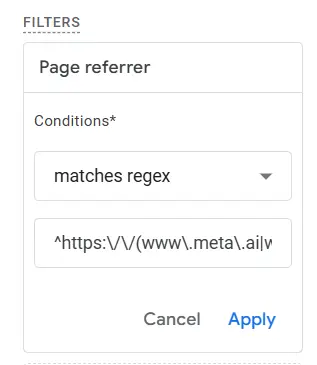
Click Apply and then Save the segment.
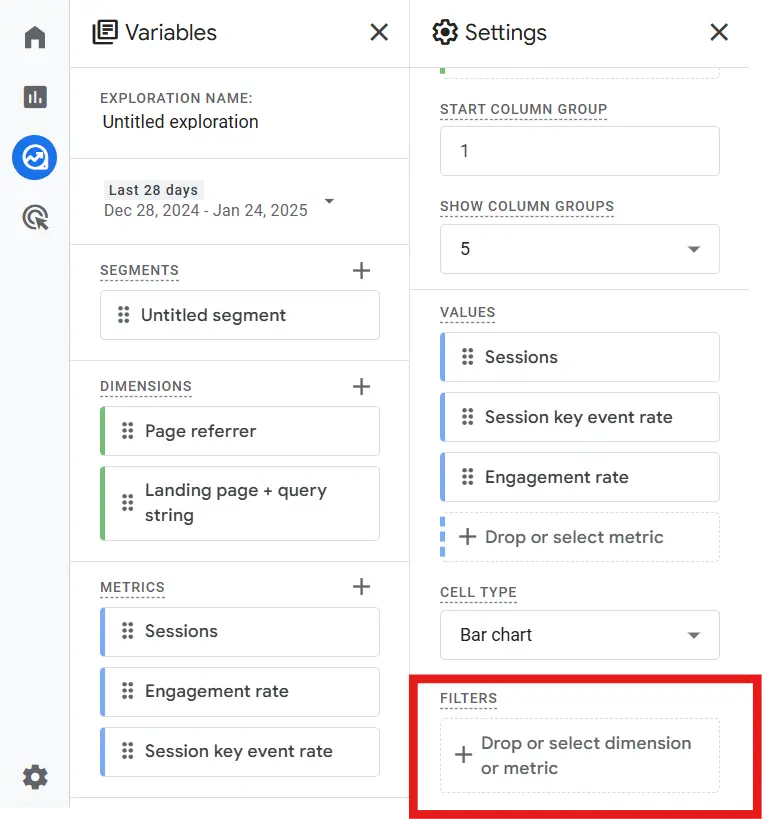
Step 6: Add dimensions to your report
In the Dimensions section, add:
- Page referrer
- Landing page + query string
These dimensions help you understand which AI platforms are sending traffic and which pages users land on.
Step 7: Add metrics for analysis
In the Metrics section, add:
- Sessions
- Engagement rate
- Sessions with key events
These metrics show not just volume, but also how valuable AI traffic is for your website.
Step 8: Build the exploration table
Drag the AI Traffic segment into the Segment comparisons area.
Drag Page referrer into Rows.
Drag your selected metrics into Values.
Optionally add Landing page + query string as a secondary row for deeper insights.
Step 9: Apply visual styling (optional)
For easier analysis, change the cell style to Heatmap. This helps you quickly spot which AI platforms and pages are driving the strongest performance.
Step 10: Save and review regularly
Your AI traffic report is now ready. Review it monthly to see which AI tools drive the most traffic and how user behaviour changes over time. As new AI platforms emerge, update your regex pattern to keep your tracking accurate and relevant.
Build an AI Traffic Dashboard in Looker Studio
Creating an AI traffic dashboard in Looker Studio helps you visualise how AI tools are driving visits and engagement across your website. This setup works well for Australian businesses that want a clear, shareable view of AI-driven performance without relying on complex exports or paid platforms.
Step 1: Connect Looker Studio to your GA4 account
Open Looker Studio and click Create then Report. Choose Google Analytics as the data source and select your GA4 property. Once connected, confirm the data source so it can be reused across charts and pages in your dashboard.
Step 2: Pull in key GA4 fields for AI analysis
Add the core dimensions and metrics you will need to analyse AI traffic. Common dimensions include Source / Medium, Session source, Page referrer, and Landing page + query string. For metrics, include Sessions, Engaged sessions, Engagement rate, Average engagement time, and Key events or conversions. These fields give you both volume and quality insights.
Step 3: Add filters to isolate AI referrals
Create a report-level or chart-level filter that includes only AI-related traffic. Use Page referrer or Session source and apply a Matches regex condition with the same AI domain pattern used in GA4. This ensures every visual on the dashboard reflects traffic coming from AI and LLM platforms only.
Step 4: Create a visual for traffic by AI source
Add a table or bar chart using Source / Medium or Page referrer as the dimension and Sessions as the metric. This visual shows which AI platforms, such as ChatGPT, Gemini, or Perplexity, are sending the most traffic to your site. It is useful for understanding which tools matter most to your Australian audience.
Step 5: Visualise AI referrals over time
Insert a time series chart with Date as the dimension and Sessions as the metric. Apply the AI filter to this chart. This helps you track growth trends, spikes, or drops in AI-driven traffic and see how it changes alongside broader marketing activity.
Step 6: Identify pages that receive AI traffic
Create a table using Landing page + query string as the dimension and Sessions or Engaged sessions as the metric. This shows which pages AI tools are recommending or linking to most often. These pages are strong candidates for further optimisation and expansion.
Step 7: Measure engagement and conversions from AI traffic
Add a scorecard or table showing Engagement rate, Average engagement time, and Conversions or key events. This helps you understand whether AI traffic is actually valuable or just driving visits without action. For Australian businesses, this insight is critical when deciding where to invest time in AI-focused content.
Step 8: Save and share your dashboard
Once your visuals are in place, save the report and set sharing permissions for your team or clients. Review the dashboard regularly and refine your filters as new AI platforms emerge or traffic patterns change. Over time, this dashboard becomes a reliable way to track and understand AI-driven growth.
If you are not sure how to set this up, just reach out to us for a Looker Studio report build. Our team is here to help you get clear, accurate AI traffic insights without the hassle.
Prepare Your Business for AI-First Search in 2026
AI is rapidly reshaping how people discover brands, and by 2026 it will influence almost every search decision. Tools like ChatGPT, Gemini, and other AI assistants are becoming the first place users go for recommendations, answers, and comparisons. If your business is not visible within these AI conversations, you risk losing attention to competitors who are already optimising for this shift. Contact us now.
Our SEO services are built to help your website rank not just in traditional search results, but inside AI-driven answers and recommendations. We focus on creating content that AI tools trust, understand, and reference, while still delivering strong engagement for real users. This approach helps your brand appear when AI tools suggest solutions, services, or products to potential customers.
Investing in AI-focused SEO now gives your business a head start before AI-driven discovery becomes the norm. Instead of reacting to changes later, you position your brand as a reliable source that AI platforms consistently surface. This is not about chasing trends, it is about securing long-term visibility as AI changes how Australians search, choose, and convert online.